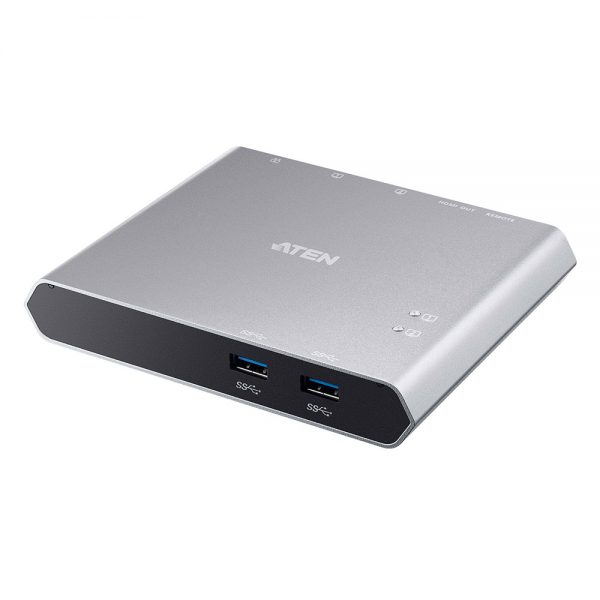
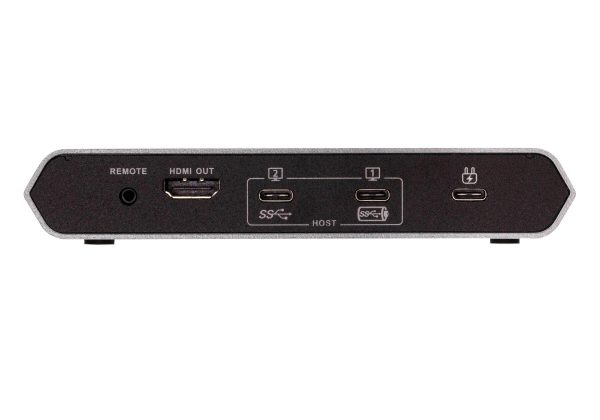
ATEN US3310 2-Port USB-C Gen 1 Dock Switch with Power Pass-through
$ 96.64
Only 4 left in stock
Overview The US3310, 2-port USB-C Dock Switch with Power Pass-through, features the combination of a multiport dock and allows one button switching between two sources – laptop and Android smart phone. Use only one set of display, keyboard, and mouse to seamlessly control two different systems and save desk space. With the remote port selector, you can put it on the most convenient place or hide it under the desk to do the quick switching. Diagram Specifications Computer Connections 2 Connectors Computer USB 3.2 Gen 1 Type-C Port 1 (Laptop) USB 3.2 Gen 1 Type-C Port 2 (Android : Samsung Dex or Huawei Desktop mode) Device 2 x USB 3.2 Gen 1 Type-A Female Video Output 1 x HDMI Female Power 1 x USB-C DC-in Female* Port 1 : Supports USB-C PD laptop charging at 5V, 9V, 15V, 20V output* Port 2 : Supports max. 5V, 2A output *Supports maximum 100W USB-C PD power adapter input. *For device charging, a Limited Power Source (LPS) certified USB-C PD Power Adapter over 65 Watt is recommended. The minimum system power requirement for basic USB functions and video output should be at least 5V, 3A. *The first 15W will supply the US3310, the next 10W will supply USB-C device connected to Port 2, and the balance power will supply USB-C device connected to Port 1. Port Selection Input Remote port selector Video Resolution Up to 3840 x 2160@30hz System Requirements Windows 10 and above, USB-C enabled computer with DP Alt Mode* * With Intel 7th-Generation Core Processor (Kaby-Lake) and above. More info about CPU generation, please find: https://www.intel.com/content/www/us/en/processors/processor-numbers.html Mac OS X 10.12 and above, USB-C enabled computer Android 8.0 and later, USB-C enabled Smartphone with DP Alt Mode** **Only Samsung and Huawei support PC-like operation, others only support mirror mode. For a list of supporting mobile device, refer to US3310’s user manual. iOS 12.1 and above, iPad Pro 3rd generation (2018)*** *** For better HID experience, iPad OS 13 and above is recommended. Power Consumption DC5V:1.24W:406BTU LEDs Selected 2 (White) Environmental Operating Temperature 0–40°C Storage Temperature -20–60°C Humidity 0–80% RH, Non-condensing Physical Properties Housing Aluminum Weight 0.33 kg ( 0.73 lb ) Dimensions (L x W x H) 14.30 x 11.90 x 2.38 cm (5.63 x 4.69 x 0.94 in.) Note For some of rack mount products, please note that the standard physical dimensions of WxDxH are expressed using a LxWxH format. Features Allows a USB-C laptop and an Android Smartphone to share one HDMI monitor and all connected USB peripherals* Provides USB Power Delivery 3.0 for laptop charging up to 85W (additional USB-C Power Adapter is needed)** Supports 4K resolutions – up to 3840 x 2160 @ 30Hz Supports Samsung DeX mode or Huawei Desktop mode*** Video DynaSync – allows EDID and HDCP monitors and computers to function flawlessly, and provides fast switching such as continuous real-time switching Switch device via remote port selector by pressing a button Plug and play – no drivers needed Multiplatform support – Windows, Mac, Android & iPad Pro (2018) *For video output to work through a USB-C port, it must support DP Alt Mode. **For device charging, a Limited Power Source (LPS) certified USB-C PD Power Adapter over 65Watt is recommended. The minimum system power requirement for basic USB functions and video output should be at least 5V, 3A. ***Compatible with smartphones launched in 2018 or later that feature video output DP Alt Mode over USB-C. For a list of supporting mobile device, refer to US3310’s user manual Package Contents 1x US3310 2-Port USB-C Gen 1 Dock Switch with Power Pass-through 2x USB-C Cables 1x Remote Port Selector 1x User Instructions
| Lenght (inches) | |
|---|---|
| Width (inches) | |
| Height (inches) |